Criterion D: Development
Criterion D shows how you built the product. Start by justifying the structure of the product, then demonstrate the techniques that best show your thinking and the complexity of your solution. For each technique, show the code, explain it, justify how you programmed it and justify how you tested it. The IB guide asks you to justify the structure of the product, demonstrate the techniques used to implement the algorithms from Criterion C, evaluate the choices you made, and justify the effectiveness of a testing strategy that covers correctness, reliability and efficiency.
What you need to produce
- A short justification of the product's structure, at the beginning, before the first technique (recommended)
- At least five techniques (recommended), each in four parts: (1) a screenshot of the code, (2) an explanation of the code, (3) a justification of how you programmed it, briefly compared with another option, and (4) a brief justification of how you tested it
- Your full, commented source code in the appendix, which every code screenshot refers to
Word budget
About 1,120 counted words, the largest share of the 2,000: a short opening on the structure, then about 175 words per technique if you show six (a little more each if you show five), including each technique's heading, which counts. The 10–12 band asks you to evaluate choices and justify testing, which takes reasoning in prose, so D gets most of the words saved by bulleted success criteria and short-cell tables. Code, screenshots and figure captions are not counted. See how words are counted and allocated.
Subsections
| Subsection | Words (plan) | Suggested range | Main evidence |
|---|---|---|---|
| Two real examples | – | – | the IB timetable exemplar and a past student's visual example |
| How to write Criterion D | – | – | guidance, exemplar lessons and a checklist |
| D0 Structure of the product | 70 | 50–80 | one short opening paragraph |
| D1 Technique 1: No double bookings | 175 | 150–185 | code + GUI + test output in one figure |
| D2 Technique 2: The weekly limit | 175 | 150–185 | code screenshot |
| D3 Technique 3: The noise rule | 175 | 150–185 | code + GUI screenshot |
| D4 Technique 4: The waiting list | 175 | 150–185 | code screenshot |
| D5 Technique 5: Releasing no-shows | 175 | 150–185 | code + log output |
| D6 Technique 6: The usage report | 175 | 150–185 | code + report output |
Below: two real examples, then one guidance section with seven parts (purpose, what to include, suggested length, worked example, supporting evidence, lessons from the IB exemplars and a completion checklist), then PracticePal's whole Criterion D as one worked example. Labels show where each piece of guidance comes from:
Official level descriptors for Criterion D (best-fit marking)
| Marks | Level descriptor (IB Computer Science guide) |
|---|---|
| 0 | The response does not reach a standard described by the descriptors below. |
| 1–3 | very limited functionality no appropriate techniques to implement the algorithms states the choices made to implement the algorithms states the testing strategy used |
| 4–6 | limited functionality at least one appropriate technique outlines the choices made states the effectiveness of the testing strategy |
| 7–9 | partial functionality some appropriate techniques explains the choices made describes the effectiveness of the testing strategy |
| 10–12 | fully functional product appropriate techniques to implement the algorithms evaluates the choices made justifies the effectiveness of the testing strategy |
Two real examples
The PracticePal features below are invented. These two are real: an official IB exemplar, and a past student whose visual presentation of code is worth copying.
IB exemplar 6: IB timetable 10/12 in Criterion D
An official IB example marked under the current IA. It presents five techniques (file reading, multithreading, singletons, an SQL database and timetable creation) in the same four parts every time.
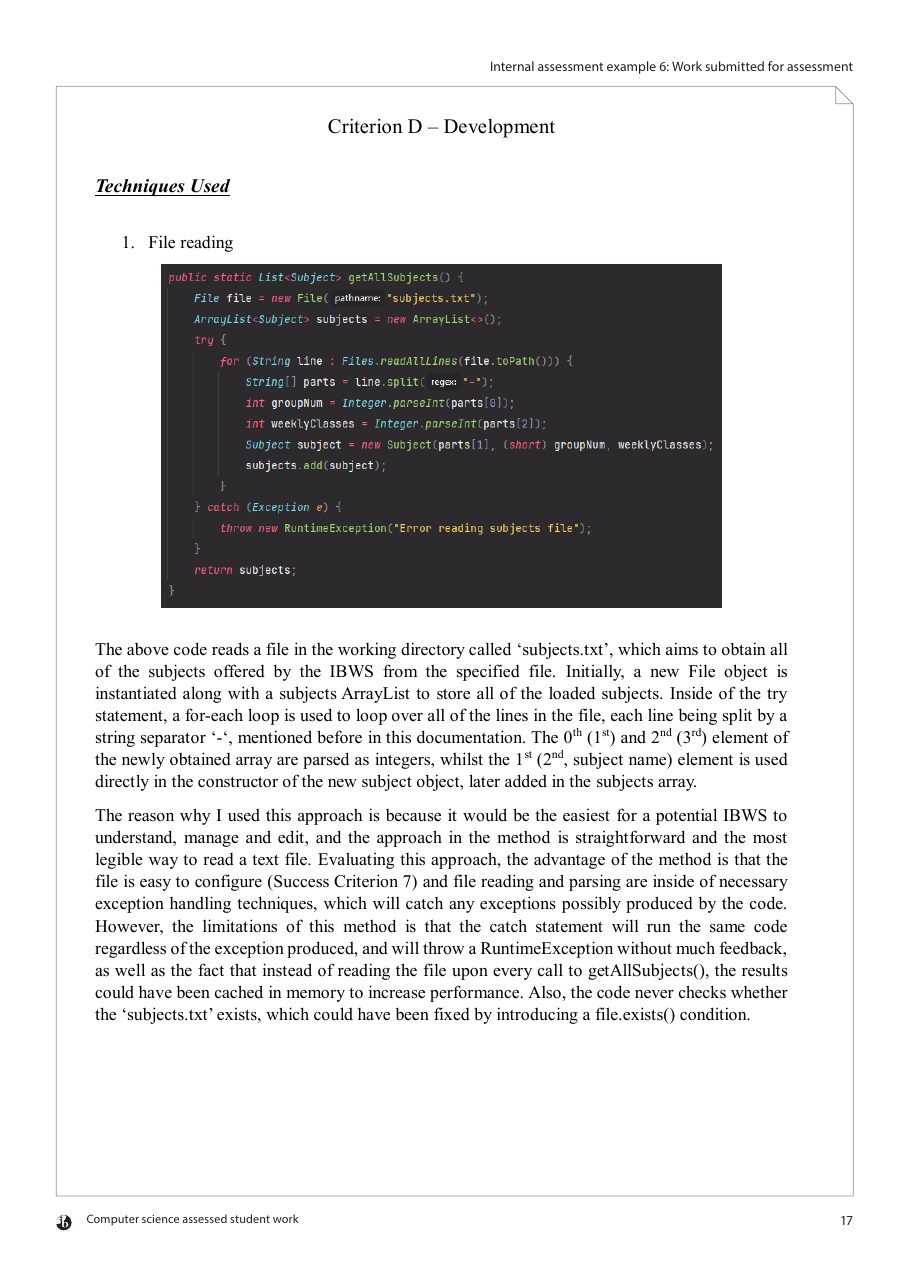
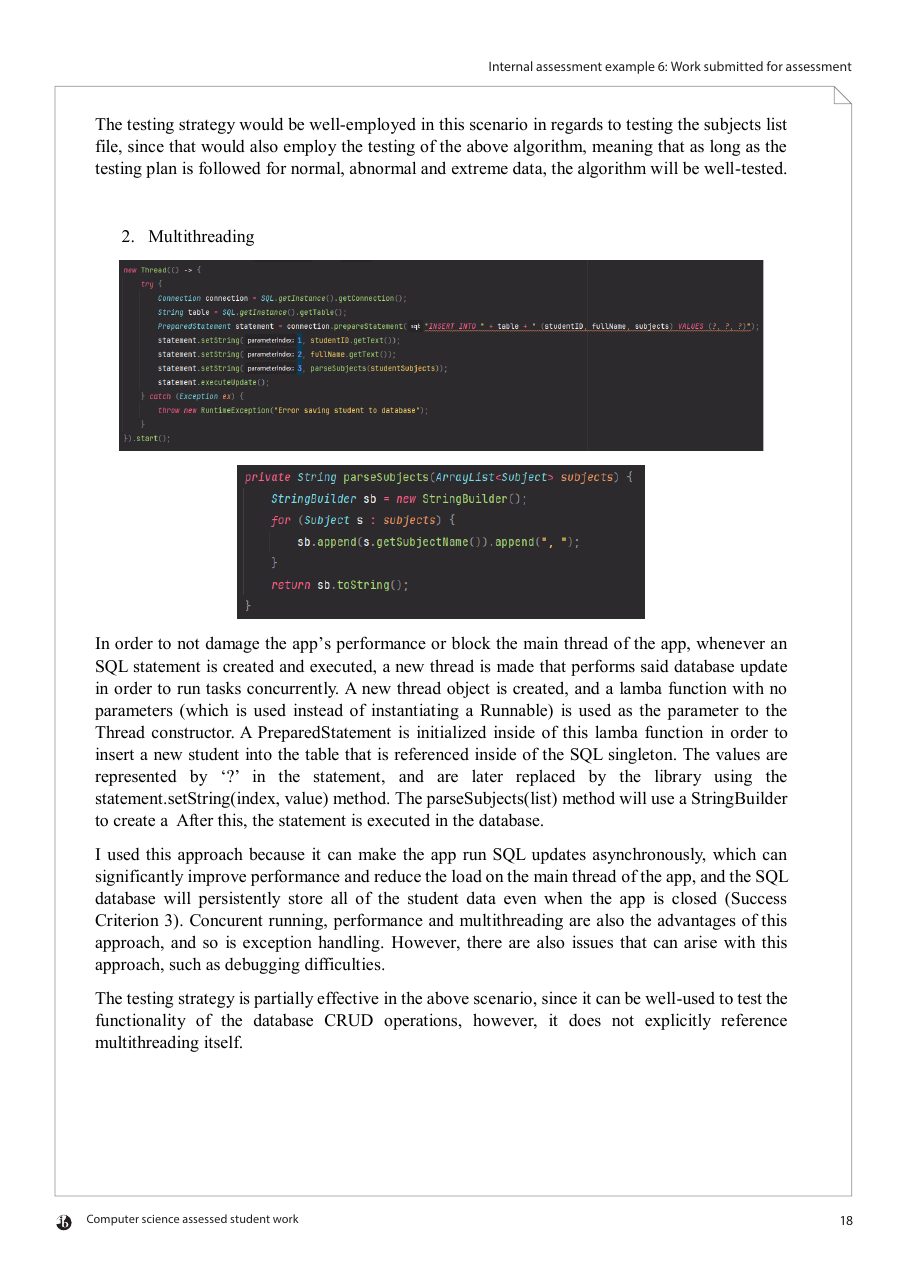
How technique 1 maps to the four parts
- Code: a screenshot of getAllSubjects() from the editor.
- Explanation: the first paragraph walks through the code: a File object, an ArrayList, a for-each loop over the lines, each split on “-” and parsed into a Subject.
- Justification: “The reason why I used this approach…”: a text file is easy for the school to edit (SC7) and reading it is wrapped in exception handling. It then evaluates the limitations: one catch for every exception, the file is re-read on every call instead of being cached, and its existence is never checked.
- Testing: a short paragraph on how testing the subjects file with normal, abnormal and extreme data also tests this method.
Do better than this example (from the examiner's comments)
- “Code has been included without comments.” Comment the code in your screenshots.
- Testing was only “somewhat described”: the testing paragraphs say the plan would test the feature but name no test, data or result. Name them.
- The configuration file “has not been integrated and must be maintained outside the solution”.
A past student: a visual way to show code
Written for the previous IA, where Development was Criterion C, so it is not marked against the current criteria. It is here for the way it presents code: the code, the GUI and the output in one picture.
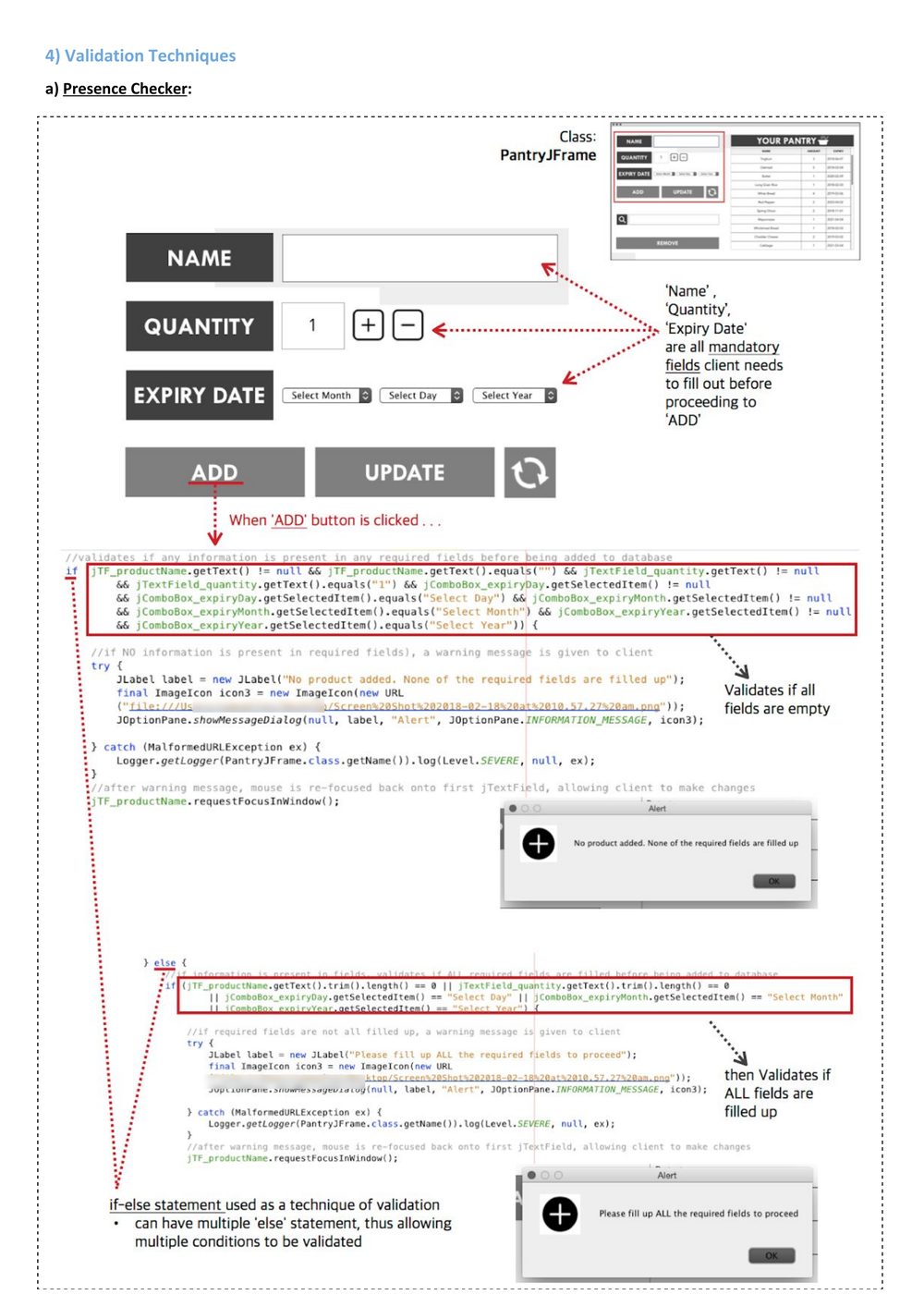
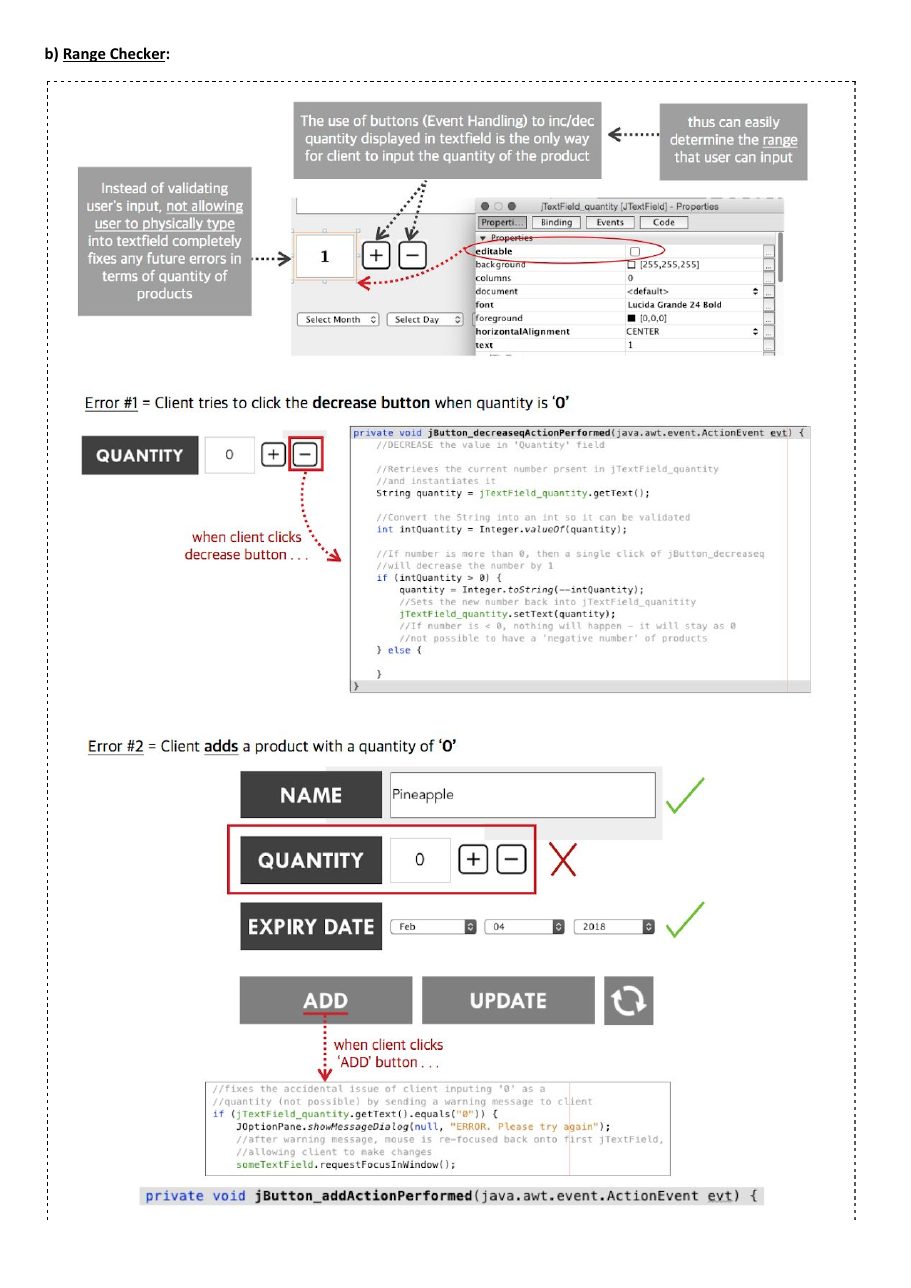
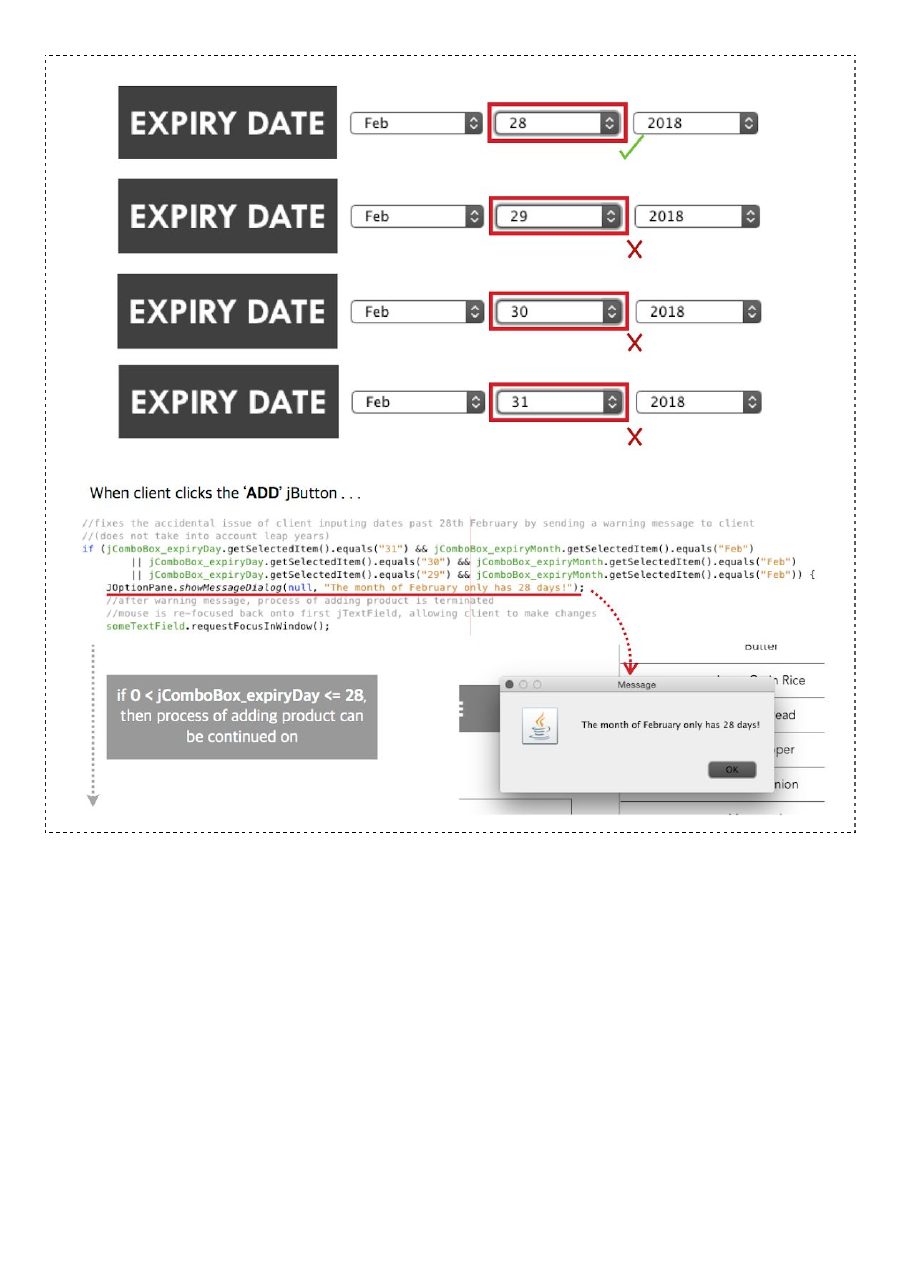
What it shows well
- Code and GUI together: a screenshot of the form with red boxes and dotted arrows from a button to the exact lines of code it runs.
- Explanation: short callouts next to the code (“Validates if all fields are empty”) plus a sentence or two of prose.
- Test cases on screen: “Error #1” and “Error #2”, and 28 to 31 February 2018, each marked with a tick or a cross next to the message it produces.
Instead of this technique, I could have put the validation rules in the database itself, for example as constraints in a larger database such as MySQL. I chose to validate in the GUI because it is more user-friendly: the user gets instant feedback in a clear message before anything is saved, rather than a database error afterwards. The + and − buttons go further for the quantity, removing non-numeric input completely. Limitation: data added to the database directly is not validated.
Tests T4–T7 cover this technique. Normal: a complete product (Butter, quantity 2, 14 March 2018) is added. Abnormal: each required field left empty, and a quantity of 0, are rejected with a message and nothing is saved. Extreme: 28 February is accepted, 29–31 February rejected, and − at quantity 0 does nothing. 29 February 2020, a leap year, was wrongly rejected until I added the year to the check.
1 Purpose
Justify the structure of your product, then present your techniques one after another, each in the same four parts: the code, what it does, why you programmed it this way, and how you know it works.
2 What to include
- IB requirementJustify the structure of the product and why the structure is appropriate.
- IA GuidePut this justification at the beginning, before the first technique, unless one of the techniques you demonstrate is the structure of the product itself (for example, how the program is divided into modules or classes); then justify it in that technique.
- IB requirementDemonstrate the techniques used to develop the product, based on the algorithms in Criterion C. Techniques may include loops, data structures, existing libraries and the integration of software tools.
- IA GuideDemonstrate at least five techniques, chosen to show the most complex parts of your solution.
- IB FAQApply techniques from the syllabus. The IA is the same for SL and HL, so SL-level techniques are the minimum expectation; choose techniques that match your success criteria and support both the functionality and the efficiency of the solution.
- IB FAQComplexity lies in the problem, not in the techniques: you do not need code far beyond the course, and should avoid developing techniques beyond it. Object-oriented programming is not required (a Python and SQL database solution without classes is fine).
- IA GuideMake sure each technique is well tested in your test plan (Criterion C) and shown in your video, so that the testing justification you give here is valid.
- IB requirementHighlight key elements of code that are important for the efficient functioning of the algorithms. Code must include relevant comments, be consistent and readable, and be referenced to the full source code in the appendix (without the appendix you cannot get full marks for techniques).
- IA Guide1 · Code. A screenshot of the code for the technique, with the file name and line numbers, referenced to the full source in your appendix.
- IA Guide2 · Explanation. Walk through what the code does, pointing to line numbers or numbered markers rather than retyping the code.
- IA Guide3 · Justification. Why you programmed it this way, briefly compared with another option, and what the choice costs or cannot do. To reach 10–12 the IB asks you to evaluate the choices (7–9 explains them; 4–6 outlines them).
- IA Guide4 · Testing. Briefly justify how you made sure it works: which tests from your plan, with normal, extreme and abnormal data, and what they showed. Across all your techniques, cover correctness, reliability and efficiency (an IB requirement).
- IA GuideIf you used AI (ChatGPT or similar), acknowledge it in a code comment and in your documentation.
- Teaching tipSuggestion: give each of the four parts its own paragraph, so the examiner can find them. Paragraphs are enough: headings for each part would count towards the 2,000 words.
- Teaching tipSuggestion: combine the code screenshot with screenshots of the GUI and the output in one figure, with numbered markers you refer to in the text. Students have used this to save words and make a technique easier to follow.
3 Suggested length
About 1,120 counted words: 50–80 for the structure, then about 150–185 per technique if you show six, or a little more each if you show five. Headings count, so keep them short; code, screenshots and figure captions do not. Spend the extra words on evaluating each choice: what it costs, what it cannot do, and what testing showed. Refer to success criteria by code (SC4), never by their text.
4 Worked example
The worked example is PracticePal's whole Criterion D, as one document: go to the worked example. Two real examples are above.
5 Supporting evidence (to be added to your appendix)
- Appendix A: the full, commented source code; each figure gives the file, lines and page.
- Appendix B: the full results of the tests you mention, with output and before-and-after screenshots.
- Keep the key result in the figure itself: the IB does not use the appendix as evidence for marks.
6 Lessons from the IB exemplars
From the IA Documentation Guide's analysis of real, examiner-graded IB Computer Science IAs.
- Example 6 (IB timetable, 10/12 in D) presents five techniques in this pattern: a code screenshot, what the code does, why this approach with its advantages and limitations, and how the testing strategy covers it.For your IA: Use the same four parts for every technique you choose.
- Code without comments was named in the examiner's overall comment on 5 of the 8 IB exemplars, including Example 6.For your IA: Comment the code you show and the code in your appendix; comments should say why, not repeat the code.
- In Examples 2 and 5 the implementation choices were only “outlined”; in Example 4 their evaluation was “not pervasively addressed”.For your IA: Justify every technique against an alternative, not just the first one.
- Example 8 (5/12 in D): the documentation “does not highlight key elements of code”.For your IA: Choose the code that carries the logic, and mark the lines that matter.
- The effectiveness of the testing strategy was “generically stated” in Examples 4, 7 and 8, and too little testing with extreme and abnormal data was criticised in Examples 2, 6 and 7.For your IA: Each testing paragraph names specific tests, data and results.
- Examples 2 and 6 were judged “not fully integrated” because questions or a configuration file had to be edited outside the product.For your IA: Let users maintain their data through the product.
7 Completion checklist
Ticks are saved in this browser only, so you can use the list while you draft.
Worked example: PracticePal's Criterion D
The whole of PracticePal's Criterion D as one document: the structure first, then six techniques, each with its code, explanation, justification and testing. The small labels beside each part are added by this website: they are not part of the document and are not counted.
Structure of the product
PracticePal is a Flask web app divided into modules by responsibility, as in the Criterion C structure chart: views.py only handles pages; rules.py, waitlist.py and reports.py hold the logic; scheduler.py runs timed jobs; db.py alone contains SQL. This lets every rule be unit-tested without a browser, and a database change affects one file. A single app.py would be quicker to write but hard to test.
Technique 1: No double bookings (SC4)
32def make_booking(con, student, room, start, loud):
33    end = start + SLOT                     # every slot is 30 minutes
34    reason = check_rules(con, student, room, start, end, loud)
35    if reason:                              # weekly limit or noise rule
36        return None, reason
37    try:
38        # BEGIN IMMEDIATE takes the write lock BEFORE the final check,1
39        # so two requests for one slot are handled one after the other.
40        # (Idea from a ChatGPT explanation of 'database is locked';
41        # code written by me.)
42        con.execute('BEGIN IMMEDIATE')
43        if db.count_overlaps(con, room, start, end) > 0:   # Q1, rechecked inside the lock2
44            con.rollback()
45            return None, 'Slot just taken'
46        booking_id = db.insert_booking(con, student, room, start, end, loud)
47        con.commit()
48        return booking_id, None
49    except sqlite3.IntegrityError:          # UNIQUE(room_code, start_time): second safeguard3
50        con.rollback()
51        return None, 'Slot just taken'
T5  touching booking ...... PASSED
T6  same slot x200 ........ PASSED 5
    200 runs, 0 duplicates
T14 30 bookings at once ... PASSED
    slowest 0.19 s
make_booking() runs when a student taps Book. BEGIN IMMEDIATE takes the write lock (1); only then does count_overlaps() check for an overlap, using the Criterion C rule (2). A free slot is saved; otherwise the student sees “Slot just taken” (4).
Checking and then inserting let two simultaneous requests both pass. Locking before the final check makes them one step, with a UNIQUE constraint as a second safeguard (3). A Python lock is simpler but fails with several processes. I tried one first: it passed with a single server worker but let duplicates through with two, which confirmed the choice. The cost, saving bookings one at a time, is acceptable when each takes under 0.2 seconds.
T5 (extreme) accepts 12:30 next to 12:00. T6 (abnormal) books one slot twice at once, 200 times: 6 duplicates before the lock, none after (5). T14 (efficiency): 30 simultaneous bookings each took under 0.2 seconds. Together they cover correctness, reliability under load and efficiency.
Technique 2: The weekly limit (SC5)
40def count_week_bookings(con, student, start):
41    """Bookings the student already has in the ISO week (Mon-Sun) of start."""
42    year, week, _ = start.isocalendar()    # ISO week, not US week (fix after T7)1
43    row = con.execute(
44        "SELECT COUNT(*) FROM booking WHERE student_id = ? "
45        "AND iso_year = ? AND iso_week = ? "2
46        "AND state IN ('confirmed', 'checked_in')",   # no-shows and cancellations do not count3
47        (student, year, week)).fetchone()
48    return row[0]
count_week_bookings() counts the student's bookings in the ISO week of the slot. isocalendar() gives the year and week, Monday to Sunday (1); one query counts the matching rows (2), ignoring cancellations and no-shows (3).
Storing each booking's ISO year and week makes this one indexed query. Querying a Monday-to-Monday date range needs no extra columns, but repeats date arithmetic wherever weeks are used. Not counting no-shows was Ms Okafor's decision. The cost is two extra columns that must stay in step with the start time, so only insert_booking() sets them and nothing edits them later.
T7 (extreme) books a third, then a fourth slot in one week, including a Sunday. It first failed: US week numbers start on Sunday, so Sunday bookings counted towards the next week. ISO weeks fixed it, and a unit test now checks the last days of December, when the ISO year can differ from the calendar year.
Technique 3: The noise rule (SC6)
71def load_neighbours(con):
72    """Room graph as a dictionary: room code -> set of rooms sharing a wall."""
73    graph = {code: set() for code in db.room_codes(con)}
74    for a, b in db.neighbour_pairs(con):   # NEIGHBOUR table, one row per wall1
75        graph[a].add(b)                    # undirected: add both directions
76        graph[b].add(a)
77    return graph
78
79def noise_clash(con, graph, room, start, end):
80    """Return the first neighbour with an overlapping loud booking, or None."""
81    for n in sorted(graph[room]):          # only this room's neighbours2
82        if db.count_loud_overlaps(con, n, start, end) > 0:   # Q3
83            return n
84    return None
load_neighbours() turns the NEIGHBOUR table into a dictionary mapping each room to the set of rooms sharing a wall, adding each wall both ways (1). For a loud booking, noise_clash() checks only that room's neighbours (2) and the message names the clash (3).
Walls are data, not if-statements: if P2 becomes a drum room, the head of music edits a table, not the code. A set gives fast membership tests without duplicates. Refusing any loud overlap in the building is simpler but blocks distant rooms. Corridor noise is not modelled. The weakness is that the table must be right: a missing wall silently allows a clash, so the admin screen lists each room's neighbours for Ms Okafor to check.
T8: a loud booking next to a loud one is refused (abnormal); a quiet one is accepted (normal). Unit tests add extreme cases: a room with no neighbours, and bookings that only touch. A loop also checks that every wall in the table works both ways.
Technique 4: The waiting list (SC7)
18def offer_next(con, room, slot):
19    """Offer a freed slot to the student at the FRONT of its waiting list (FIFO)."""
20    entry = db.first_waiting(con, room, slot)   # ORDER BY joined_at LIMIT 11
21    if entry is None:
22        return None                             # nobody waiting: slot is just free
23    db.set_entry_state(con, entry.id, 'offered', offered_at=now())2
24    mail_offer(entry.student_id, room, slot, expires=now() + OFFER_TIME)   # 15 minutes3
25    return entry.student_id
When a booking is freed, offer_next() reads the waiting list in joined_at order and takes the oldest entry (1), so the table acts as a first-in, first-out queue. The entry becomes “offered” (2) and the student is emailed a 15-minute deadline (3).
A queue matches the rule agreed with Ms Okafor: first to join, first offered. An in-memory collections.deque would be lost on every server restart; the database keeps the queue and shows the head of music who is waiting, for one query per offer. A priority queue was considered, but nothing in the requirements ranks students, and a rule students can predict matters more here than flexibility.
T9 (normal): three students join and the first is offered the freed slot. Extreme cases accept at 14:59 and expire at 15:00, passing the offer on. Joining twice (abnormal) is refused. A fake clock avoided real waiting, and T9 was repeated after a server restart to show the queue survives.
Technique 5: Releasing no-shows (SC8)
12def release_no_shows(con):
13    """Run every 5 minutes by APScheduler (set up in app.py)."""
14    cutoff = now() - timedelta(minutes=GRACE)          # GRACE = 101
15    late = db.unchecked_bookings(con, before=cutoff)   # Q6: confirmed, no check-in
16    for b in late:
17        db.set_booking_state(con, b.id, 'no_show')     # kept for the usage report2
18        waitlist.offer_next(con, b.room_code, b.start_time)   # technique 43
19    con.commit()
20    log.info('released %d no-shows', len(late))
12:35:00  released 0 no-shows
12:40:00  released 0 no-shows
12:45:00  released 1 no-shows   P5 12:30 4
12:45:00  offer sent: P5 12:30 -> student 1043
APScheduler runs release_no_shows() every five minutes. It finds confirmed bookings that started more than ten minutes ago (1) without a check-in, marks each as a no-show rather than deleting it (2), and offers the slot to the waiting list (3).
A fixed-interval job keeps no state, so it survives restarts. A timer per booking would be exact, but every timer would be lost when the server restarts each night. The cost is precision: a booking may be released up to five minutes late. In hindsight five minutes was too generous for 30-minute lunchtime slots; a one-minute interval would cost little and is evaluated under SC8.
T10 (extreme): a booking without a check-in must be kept at +9 minutes and released after +10. It was released at +12 (4), revealing the delay. Running the job twice (abnormal) never records a no-show twice. The log showed each run takes under 50 ms, so a shorter interval is feasible.
Technique 6: The usage report (SC10)
9def usage_report(con, year, week, path):
10    """Write one CSV row per room for an ISO week (SC10)."""
11    rows = db.week_usage(con, year, week)   # GROUP BY room: bookings, minutes, no-shows1
12    with open(path, 'w', newline='') as f:
13        out = csv.writer(f)                 # quotes any field containing a comma
14        out.writerow(['room', 'bookings', 'used_%', 'no_shows'])
15        for r in rows:
16            avail = db.available_minutes(con, r.room, year, week)   # 3,000 minus blocked time
17            used = 100 * r.minutes / avail if avail else 0   # room blocked all week2
18            out.writerow([r.room, r.bookings, round(used, 1), r.no_shows])
19    return path
room  bookings  used_%  no_shows
P1    41        68.3    3
P2    37        61.7    1
P3    0         0       0    3
P5    52        86.7    4
usage_report() writes one CSV row per room for an ISO week. One grouped query returns each room's bookings, minutes and no-shows (1); the percentage used is minutes booked divided by minutes available, 3,000 less any blocked time (2).
Grouping in SQL lets the database count, so Python handles one row per room. The csv module, rather than joined strings, stops a comma in a room name breaking the file. CSV opens in Excel, which Ms Okafor uses; a PDF looks better but cannot be filtered. The grouped query relies on SQLite's date functions, so another database would need it rewritten; for one school that is an acceptable risk.
T12 uses a busy week (normal) and an empty week (extreme), checked against hand counts. A room blocked all week caused a division by zero; the guard now reports 0% (3). Totals were checked against the bookings table so that no booking is counted twice.
Criterion D worked examples: word total
| Subsection | Planning allocation | Worked example (counted words) |
|---|---|---|
| D0 Structure of the product | 70 | 69 |
| D1 Technique 1: No double bookings | 175 | 166 |
| D2 Technique 2: The weekly limit | 175 | 158 |
| D3 Technique 3: The noise rule | 175 | 171 |
| D4 Technique 4: The waiting list | 175 | 164 |
| D5 Technique 5: Releasing no-shows | 175 | 161 |
| D6 Technique 6: The usage report | 175 | 159 |
| Total | 1120 | 1048 |
The fictional PracticePal documentation uses 1048 of the 1120 counted words planned for Criterion D. Across all five criteria it stays within 2,000; see the budget table.